There are a growing number of biomedical services out there on Wild Wild Web for performing various computations on DNA, RNA and proteins as well as the associated scientific literature. Currently, using and debugging these services can be hard work. SOAP UI (SOAP User Interface) is newish and handy free tool to help debug services and get your in silico experiments and analyses done, hopefully more easily.
So why should bioinformaticans care about Web Services? Three of the most important advantages are:
- They can reduce the need to install and maintain hundreds of tools and databases locally on desktop(s) or laboratory server(s) as these resources are programmatically accessible over the web.
- They can remove the need for tedious and error-prone screen-scraping, or worse, “cut-and-paste” of data between web applications that don’t have fully programmatic interfaces.
- It is possible to compose and orchestrate services into workflows or pipelines, which are repeatable and verifiable descriptions of your experiments that you can share. Needless to say, sharing repeatable experiments has always been important part of science, its shouldn’t be any different on the Web of Science.
All this distributed computing goodness comes at a price though and there are several disadvantages of using web services. We will focus on one here: Debugging services, which can be problematic. In order to do this, bioinformaticians need to understand a little bit about how web services work and how to debug them.
Death by specification
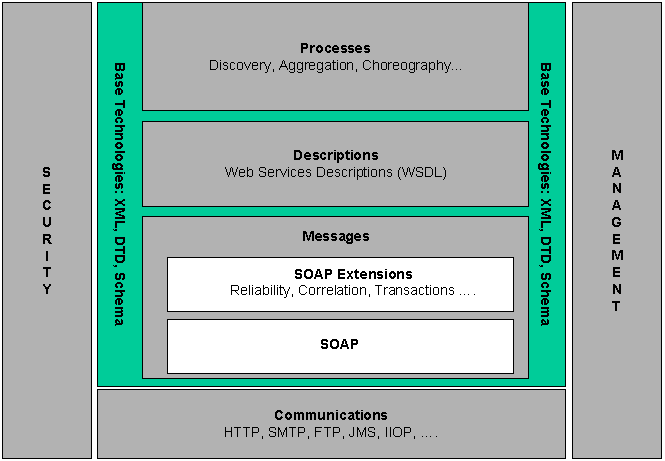
Debugging services sounds straightforward, but many publicly available biomedical services, are not the simpler RESTian type, but the more complex SOAP-and-WSDL type of web service. Consequently, debugging usually requires a basic understanding these protocols and interfaces, the so-called “Simple” Object Access Protocol (SOAP) and Web Services Description Language (WSDL). However these specifications are both big, complicated and being superceded by newer versions so you might lose the will-to-live while reading them. Also, individual services described in WSDL are easier for machines to read, than for humans, and therefore give humble bioinformaticians a big headache. As an example, have a look at the WSDL for BLAST at the DNA Databank of Japan (DDBJ).
So, if you’re not intimately familiar with the WSDL 1.1 specification (frankly, life is too short and they keep moving the goal-posts anyway), it is not very clear what is going on here. WSDL describes messages, port types, end points, part-names, bindings, bla-bla-bla, and lots of other seemingly unnecessary abstractions. To add insult to injury WSDL is used in several different styles and is expressed in verbose XML. Down with the unnecessary abstractions! But the problems don’t stop there. From looking at this WSDL, you have to make several leaps of imagination to understand what the corresponding SOAP messages this BLAST service accepts and responds with will look like. So when you are analysing your favourite protein sequence(s) with BLAST or perhaps InterProScan it can be difficult or impossible to work out what went wrong.
Using SOAPUI
This is where SOAPUI, can make life easier. You can launch SOAPUI using the Java Web Start, load a WSDL in and you can begin to see what is going on. One of the nice features, is it will show you what the SOAP messages look like, which saves you having to work it out in your head. So, going back to our BLAST example…
- Launch the SOAPUI tool and select File then New WSDL Project (Give project a name and save it when prompted).
- Right click on the Project folder and select add WSDL from URL
- Type in http://xml.nig.ac.jp/wsdl/Blast.wsdl or your own favourite from this list of molecular biology wsdl.
- When asked: Create default requests for all operations select Yes
- The progress bar will whizz away while it imports the file, once its done, you can see a list of operations
- If you click on one of them e.g. searchParam then Request1, then select Open Request Editor it spawns two new windows…
- The first (left-hand) window shows the SOAP request that is sent to the BLAST service:
<soapenv:Envelope
	... boring namespace declarations ... >
	 <soapenv:Body>

		<blas:searchParam soapenv:encodingStyle="http://schemas.xmlsoap.org/soap/encoding/">
			<!-- use BLASTp -->
			<program xsi:type="xsd:string">blastp</program>

			<!-- Use SWISSPROT data  -->
			<database xsi:type="xsd:string">SWISS</database>

			<!-- protein sequence -->
			<query xsi:type="xsd:string">MHLEGRDGRR YPGAPAVELL QTSVPSGLAE LVAGKRRLPR GAGGADPSHS</query>

			<!-- no parameters -->
			<param xsi:type="xsd:string"></param>
		</blas:searchParam>

	</soapenv:Body>
</soapenv:Envelope>
- When you click on the green request button, this message is sent to the service. Note: you have to fill in the parameters values as they default to: “?”.
- After submitting the request above, the SOAP response appears in the second (right-hand) window:
<soap:Envelope
... namespace declarations... >
   <soap:Body>

      <n:searchParamResponse xmlns:n="http://tempuri.org/Blast">
         <Result xsi:type="xsd:string">BLASTP 2.2.12 [Aug-07-2005] ...
		 Sequences producing significant alignments:                      (bits) Value
		 sp|Q04671|P_HUMAN P protein (Melanocyte-specific transporter pro...   104   8e-23 ...
		 </Result>
      </n:searchParamResponse>
   </soap:Body>
</soap:Envelope>
Not all users of web services will want the gory details of SOAP, but for serious users, its a handy tool for understanding how any given web service works. This can be invaluable in working out what happened if, or more probably when, an individual service behaves unexpectedly. If you know of any other tools that make web services easier to use and debug, I’d be interested to hear about them.
Conclusions: It’s not rocket science
In my experience, small tools (like SOAPUI) can make a BIG difference. I’ve used a deliberately simple (and relatively reliable) BLAST service for demonstration purposes, but the interested reader / hacker might want to use this tool to play with more complex programs like the NCBI Web Services or InterProScan at the EBI. Using such services often requires good testing and debugging support, for example, when you compose (or “mashup”) services into complex workflows, using a client such as the Taverna workbench. This is where SOAP UI might just help you test and debug web services provided by other laboratories and data centres around the world, so you can use them reliably in your in silico experiments.
Further reading
If you are interested in using Web Services to perform your own bioinformatics experiments, you may be interested in the following:
- A framework for deploying bioinformatics applications as high-throughput Web services on a BioGrid. IBM DeveloperWorks
- Integrate high-throughput services with Web services. IBM DeveloperWorks
- Deploying and consuming bioinformatics Web services. IBM DeveloperWorks
- Taverna: a tool for building and running workflows of services
- European Bioinformatics Institute (EBI) documentation on SOAPUI
- Automatic online data integration pipelines with Expression Profiler for bioinformatics programmers. Tutorial at ISMB 2006, Fortaleza, Brazil by Misha Kapushesky
- ACM Queue interview with Werner Vogels on the use of Web Services at Amazon.com
- This post was originally published on nodalpoint with comments

This work is licensed under a Creative Commons Attribution-Noncommercial-Share Alike 3.0 License.


 O'Really?